 The
next step was to install the 3Com network cards in the two PCs (the server had
one already). Win 98 in the "littlecomputer" and Win 2000 in the
"bigcomputer" recognized and installed these without any trouble.
The
next step was to install the 3Com network cards in the two PCs (the server had
one already). Win 98 in the "littlecomputer" and Win 2000 in the
"bigcomputer" recognized and installed these without any trouble.The
next step was to install the 3Com network cards in the two PCs (the server had
one already). Win 98 in the "littlecomputer" and Win 2000 in the
"bigcomputer" recognized and installed these without any trouble.
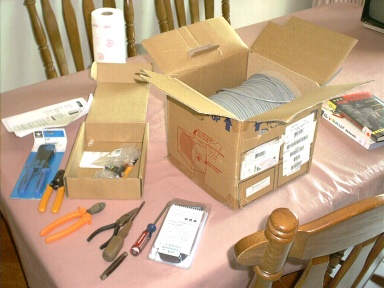
The folks at work graciously let me use their cable, boots, and crimper tools to make the Cat 5 network cables I needed for my network. They also had a "Microtest" tester that tests the crimped cable connectors that are installed to see if all 8 wires are connected properly. I stripped the outer sheath, then the insulation off of all 8 wires, put the 8 wires in the correct order by color, and fitted them inside the RC-45 connector boot. Unfortunately the tester appeared to malfunction, showing the same reading whether a connector was inserted or not. I found out later that it was not working properly. I tried 3 different cables. Being anxious to get my network set up, I went to an Electronics store and bought the needed cables. What I learned: making network cable ends is tedious & would come easier with a lot of practice. In a corporate environment the books about networks that I'm reading suggest that the cable installation be contracted out to professionals, and now I can see why. I don't think it would be cost-effective to pay employees to make & run these cables, compared to the time that could be saved by hiring professionals.
Next I ran the cables from the two PCs into the bedroom that had my server in
it. I chose to put them under our carpeting rather than going into the walls and the attic. This took much
less cable and was easier.
carpeting rather than going into the walls and the attic. This took much
less cable and was easier.
| PAGE 3 > | <BACK | HOME |